Digital Permission Slips for Schools
Replace paper with digital permission slips. Parents e-sign and pay online from any phone, computer, tablet, etc. Reminders go out automatically, and you see who hasn't signed.

Create Permission Slips
Easily create permission slips with custom questions, costs, and target audiences.
Send Notifications
Automatically send email and text reminders to parents. Resend to non-responders.
Collect Digital Signatures
Parents respond online with legally valid e-signatures.
Collect Payments
Securely accept credit card payments, cash, or check for permission slip fees.
Track Responses
View real-time status of completed, pending, and unpaid permission slips.
Generate Reports
Export responses to Excel and download signed PDFs, one at a time or all at once.
Initially skeptical, I'm now a huge fan of ClassroomParent's permission slip feature. It's simplified complex permission requirements, made duplication effortless, and parents love the ease of online completion.
The platform's intuitive design, real-time reporting, and integrated payment system have streamlined our processes. It has also significantly improved parent engagement. We're seeing higher return rates and have received positive feedback from parents.
ClassroomParent's responsiveness to feedback is exceptional. Their commitment to continuous improvement is evident.
How digital permission slips work
ClassroomParent is a permission slip app built for schools and parent organizations. Instead of sending paper forms home in backpacks and counting envelopes of cash, you send an online permission slip that parents complete in a couple of minutes from their phone or computer.
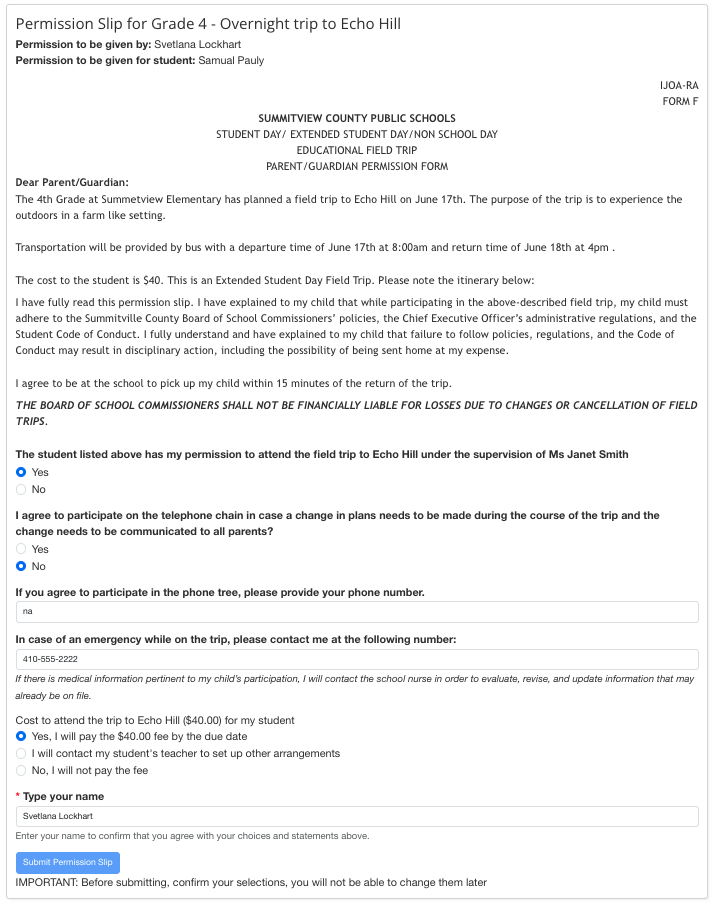
- Create the permission slip. Add the trip details and your district's required form language, any custom questions you need answered – emergency contacts, allergies, chaperone availability, phone tree sign-up – and a fee if there is one. Choose who receives it: one class, a grade, a club, or the whole school. Running the same trip every year? Duplicate last year's slip and update the date.
- Send it to families. Parents get the permission slip by email and text message. It opens on any phone or computer, and parents can add ClassroomParent to their phone's home screen so it works just like an app. With translations turned on, the entire permission slip is available in Spanish.
- Parents sign and pay online. Parents answer your questions, sign with a legally valid electronic signature, and pay by credit card – no lost forms, no cash in envelopes. Families who prefer paper can get a printable copy, and staff can record cash or check payments manually.
- Track responses and follow up. A real-time dashboard shows who has signed, who hasn't, and who still owes a payment. Send reminders only to the families who haven't responded, export responses to Excel for the trip roster, and download signed PDFs – one at a time or all at once.
Why schools switch from paper to electronic permission slips
- Fewer missing forms. Paper slips get lost in backpacks. Online permission slips arrive in the parent's inbox and on their phone, and reminders follow up automatically.
- No more chasing. Teachers and office staff stop calling home and sorting through stacks of paper – the dashboard shows exactly who is still outstanding.
- Payments in one place. Trip fees are collected with the permission slip, so there's no separate envelope of cash to count and reconcile.
- District paperwork in one click. Need to submit signed forms to the district? Download every completed permission slip as a PDF, each showing the parent, student, answers, and signature.
- Every family can take part. Spanish translation, printable copies, and phone-friendly forms mean no family is left out – including working parents who sign during a lunch break.
- Teachers can do it themselves. Give teachers permission to create permission slips for their own classes or grades, without routing every trip through the front office.
What schools use online permission slips for
- Field trips and overnight trips
- Sports, clubs, and after-school programs
- Photo and media releases
- Class parties and events with a fee
- Any form that needs a parent's signature
Looking for ways to get more slips back on time? Read our seven strategies to improve permission slip completion.
Digital permission slip FAQs
Are electronic signatures on permission slips legally valid?
Yes. ClassroomParent collects legally valid electronic signatures, and every completed permission slip can be downloaded as a signed PDF for your records. Check your district's policies for any trip-specific requirements.
Can we use our district's official permission form?
Yes. Include your district's required wording and questions in the permission slip. Parents complete it online, and you can download the signed forms as PDFs to submit to the district.
Can parents pay trip fees when they sign?
Yes. You can add a fee to any permission slip, and parents pay securely by credit card as they sign. If a family pays by cash or check, staff can mark it as paid.
Can I send a permission slip to just one class or grade?
Yes. Each permission slip can target a single homeroom, a grade, a group such as a team or club, or the whole school. Teachers can be given permission to create slips for their own classes.
What happens when parents don't respond?
ClassroomParent sends reminders by email and text, and you can resend to only the families who haven't completed the slip – without bothering everyone who already has.
What about families who don't use email or prefer paper?
You can print a copy of any permission slip to send home. With translations turned on, the full permission slip is also available in Spanish.
Can we reuse permission slips from year to year?
Yes. Duplicate an existing permission slip, change the date and details, and send it – no need to rebuild it from scratch.
Is student and family information secure?
Yes. ClassroomParent uses industry-standard encryption and complies with student privacy laws including FERPA and COPPA. Responses are accessible only to authorized users.
Is there a permission slip app for parents?
Yes. ClassroomParent works in any phone or computer browser, and parents can install it on their phone's home screen so it opens and works like an app – no app store download required.
Permission slips are one part of ClassroomParent. The same platform handles parent communication, event and volunteer sign-ups, and school fundraising.